


Epic Freebie Games Radar
Arioch Pds - Apps & Games
I tend to discover free PC games at the worst possible moment: when I am busy, away from my computer, or already looking at something else. Epic Freebie Games Radar is designed for that exact problem. It is an events app from Arioch Pds - Apps & Games that follows limited-time game giveaways and brings them into one place, covering services such as Epic Games, Steam, Amazon and Rockstar. After using it as a lightweight alert and checking tool, I found its main value is not entertainment inside the app itself. Its value is helping me avoid missing a temporary offer.
The app is free, aimed at Everyone, and works on Android devices starting with Android 7.0. Its current version is 6.0.3, and its popularity is easy to understand: it has passed five million installs, with an average score of 4.5 from around twenty-two thousand ratings. Those figures suggest a mature audience, but they do not remove the need to understand how the app fits into your routine. This is most useful for people who regularly claim PC games and want a quicker way to notice new opportunities, not for someone looking for a full game store or a place to play.
The useful capability: keeping several giveaway sources in view
The feature I kept returning to was the app’s ability to gather freebie information from multiple gaming platforms instead of making me check each one separately. That sounds simple, but it changes the habit involved. Without a central radar, I might open several websites, scroll through launcher pages, or rely on social media posts that arrive late or get buried. Here, I can use one events-focused app as a first check before deciding whether an offer deserves my attention.
That distinction matters. Epic Freebie Games Radar does not turn a temporary giveaway into an automatically owned game. I still need to follow the relevant platform’s normal claiming process, and I still need the appropriate account where the offer is hosted. The app is best understood as an early-warning layer. It helps me notice an event; the platform itself remains responsible for the claim and the eventual library.
I also like that the coverage is broader than a single-store tracker. Someone who only watches Epic Games may miss a worthwhile offer on Steam, Amazon or Rockstar. A multi-source view is especially handy if my game collection is spread across different launchers. It saves attention rather than money directly, because the real saving comes from remembering to claim a game before the event ends.
Related News

Instagram Is No Longer a Photo App. It Is an Attention Engine

Microsoft Teams Mobile: When Collaboration Becomes Navigation

How the NFL App Adapts to Android and iOS Updates

Temu: Elevate Your Shopping Experience to Billionaire Status

Why Traffic Rider Works Best as a Precision Reflex Game

How Google’s Find Hub Transforms Everyday Searches
The important benefit is reduced checking effort, not a replacement for the stores themselves. That is the capability I would judge most heavily. If you already have a reliable daily routine for every launcher, the app may feel unnecessary. If you check irregularly, it can become a practical reminder of what is happening across several services.
What this changes in an ordinary week
Imagine that I have a few minutes during a commute or lunch break. I can open the app and see whether there is a current giveaway worth investigating. I do not need to start a desktop launcher, wait for it to load, and search through a store page designed for browsing rather than quick monitoring. If something catches my eye, I can make a note to claim it later when I am at my computer and ready to sign in.
That workflow is more useful than it first appears. Free offers are often easy to ignore because they arrive among regular promotions, new releases and recommendations. A dedicated events app gives the giveaway a clearer context. I am not browsing for a game to buy; I am checking whether there is a temporary opportunity that needs action.
Gallery
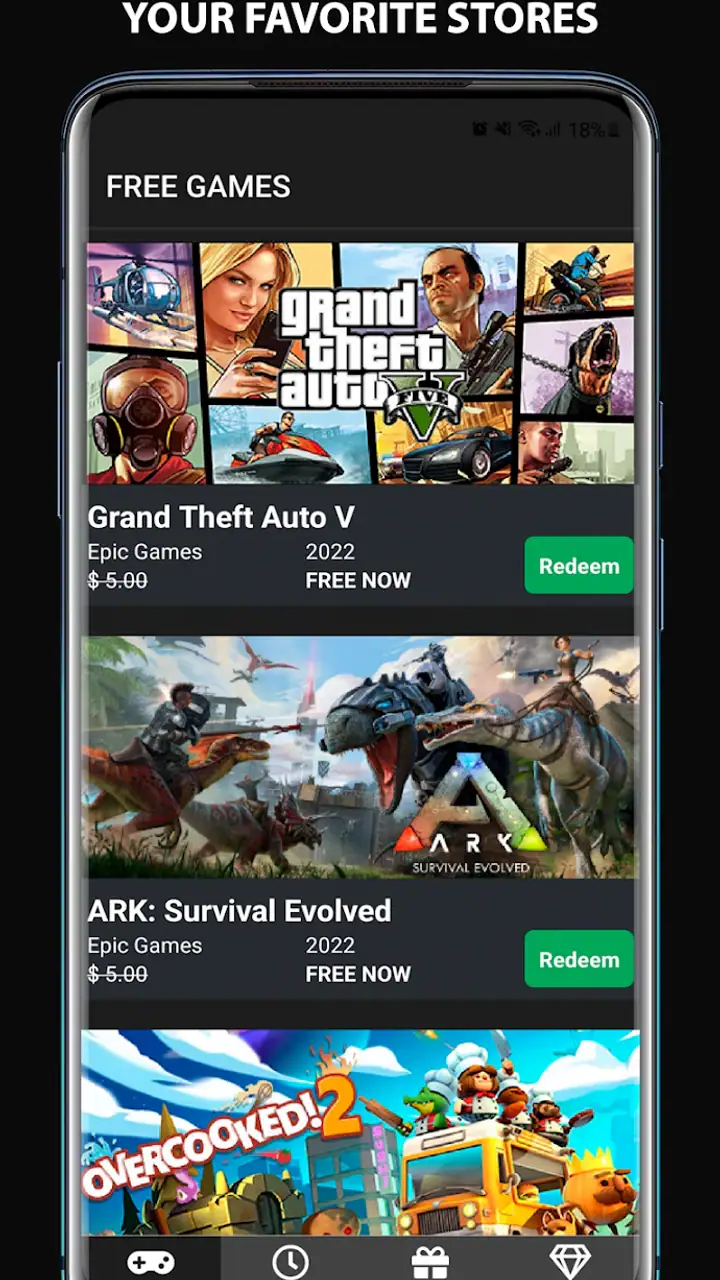
There is also a useful separation between discovery and evaluation. I can notice an offer on my phone, then decide later whether I actually want it. That prevents me from confusing “free to claim” with “worth installing immediately.” My library can grow without forcing me to download every title at once, provided I remember that claiming and installing are separate steps.
Using it in practice without creating more noise
My best approach is to treat the app as a short, purposeful check rather than another feed to scroll endlessly. I open it when I want to review current events, look for offers connected to the platforms I use, and then leave. This keeps the app from becoming a distraction. The point is to reduce the number of places I monitor, not to add another source of constant browsing.
A useful routine is to check before a gaming session or on a regular day when I already manage my digital library. If I see an item for a service I do not use, I can ignore it. If it belongs to a platform where I already have an account, I can decide whether to claim it. This small filter is important because a list spanning several providers will naturally include offers that are irrelevant to any one person.
For me, the most practical workflow is “spot now, claim later.” When I am away from a desktop, I use the app to identify an event and remember which service hosts it. Later, I open that service directly and complete the claim there. This avoids trying to perform a rushed account task on a small screen and keeps account actions inside the platform that actually owns the offer.
Another useful habit is to distinguish a genuine giveaway from a general discount or promotional event. The app’s purpose points me toward freebie opportunities, but I still read the details before acting. A title may be free only during a particular window, may belong to a platform I rarely use, or may not suit the hardware I have available. The app helps with awareness; it does not eliminate the need for a quick judgment.
I would also avoid assuming that seeing an item means I have secured it. I consider the game safely added only after I have completed the claim on the relevant service and seen the platform confirm it. That is a small but important safeguard for anyone who is building a collection around temporary events.
A realistic use case for a mixed launcher library
Suppose I use Epic Games for some titles, Steam for others, and occasionally claim offers through Amazon or Rockstar. Checking four separate places is easy to postpone, especially when none of them is offering something I urgently need. A central radar gives me a reason to make one quick review. If there is nothing relevant, I lose very little time. If there is a game I want, I have caught it before moving on with my day.
This is where the app feels more valuable than a normal store app. A store is usually optimized for selling, recommending and displaying a large catalog. Epic Freebie Games Radar is more focused on the event itself: what is temporarily available and where I should look next. That narrower purpose makes it better for monitoring, while the official store remains better for account management, installation, updates and detailed ownership information.
It is also more focused than relying on a general gaming news feed. News feeds may mix trailers, rumors, reviews and announcements with giveaway notices. That can be enjoyable, but it makes a time-sensitive offer easier to miss. Here, the subject is narrower, so I can check it with a specific question in mind: is there a free game I should claim today?
Where the convenience has limits
The main trade-off is that a central list can make several services look equally convenient when they are not equally relevant to me. If I use only one platform, information from the others adds visual clutter. I need to apply my own filter instead of expecting the app to know which accounts, launchers or devices matter to me.
There is a second layer of friction: discovery is not completion. I still have to move to the hosting service, use the required account, and follow that service’s claim process. Anyone hoping for one-tap collection across every provider will find the experience less seamless than the word “radar” might suggest. I see this as a reasonable boundary, but it should be clear before installing.
Temporary events also require attention to timing. A tracker is useful only if I check it often enough to act. If I open it once every few weeks, I may still miss short offers. The app can make awareness easier, but it cannot make an expired event available again. I get the best results when I attach the check to an existing habit, such as planning my weekend gaming time.
Another limitation is decision fatigue. A growing list of free games can encourage me to claim everything simply because it costs nothing. That can leave me with a crowded library and no clearer idea of what I actually want to play. I now ask myself three questions before switching to the external platform: do I recognize the game or developer, do I use the service, and would I realistically install it later? If the answer is no to all three, I usually skip it.
People who want deep editorial coverage may also prefer a gaming news site or a store’s own discovery tools. This app’s strength is quick event awareness, not long-form criticism, extensive community discussion or a complete comparison of every game. I would use it alongside those resources, not as a substitute for them.
Privacy and account expectations in everyday use
I would approach the app with a simple account rule: use it to discover offers, but perform account-sensitive actions on the official platform. That keeps my login routine clear and avoids treating a third-party events app as if it were the owner of my game library. The app’s usefulness does not depend on handing over control of my launcher accounts; its role is to point me toward events worth checking.
I also would not install it expecting a game to run inside the app. It belongs to the Events category, and its job is monitoring freebie activity. If I want to download, install or play a title, I continue in the relevant gaming service. Understanding that division prevents disappointment and makes the app easier to use correctly.
The age rating of Everyone makes it approachable for a broad audience, but that does not mean every listed game will suit every player. The app can surface offers across different services, while the content and suitability of an individual title depend on that title. I still check the game’s own information before claiming it for a younger player or a shared family device.
Who gets the most value from this radar
I would recommend it most strongly to PC players with accounts on several participating platforms, especially those who have already missed a giveaway because they did not check in time. It is also a good fit for people who prefer a phone-based reminder instead of opening a desktop launcher whenever they want to scan for events.
It suits occasional players as well. You do not need to be deeply involved in gaming news to benefit. If you play only on weekends, a quick review before your free time can reveal something worth claiming. The app can help turn scattered promotions into a manageable routine without asking you to follow every gaming website or social account.
Collectors may appreciate it for a different reason. Claiming a title now and installing it later can be a sensible way to build a library over time. I would still recommend keeping the collection intentional, because “free” does not remove storage limits, download time or the effort of choosing what to play.
On the other hand, I would skip it if I use only one store and already check that store reliably. In that case, the official app or website is probably the cleaner choice because it handles discovery, claiming and library management in one place. I would also skip it if I want detailed game reviews, multiplayer matchmaking, cloud saves or direct gameplay; those are outside this app’s purpose.
The developer, Arioch Pds - Apps & Games, has kept the concept focused enough that I can understand its role quickly. The free price makes trying it low-risk, and the broad Everyone rating removes a common barrier for casual households. Still, the real question is not whether it costs anything. It is whether I am the kind of player who benefits from a separate monitoring layer between me and several official stores.
My practical recommendation
Before deciding, I would list the platforms I actually use and ask how often I miss their free offers. If the answer is “often,” this app has a clear job. I would install it, check it at a repeatable time, and use it only to identify events. I would then claim games through the appropriate official service, verify that the claim completed, and avoid treating every listing as an obligation.
If my library is already under control, I would not expect a dramatic change. The app will not make a game more enjoyable or remove the separate steps involved in claiming and installing it. Its improvement is quieter: fewer scattered checks, less dependence on memory, and a better chance of noticing a limited-time event while it is still useful.
After trying it, my opinion is positive but specific. Epic Freebie Games Radar is a practical monitoring companion, not a complete gaming platform. Its multi-service focus gives it a real advantage over checking one launcher at a time, while its dependence on external stores keeps the experience from being completely seamless. For players who want a simple way to watch Epic Games, Steam, Amazon and Rockstar giveaways from an Android phone, it is an easy recommendation. For everyone else, especially single-platform users who already have a dependable routine, the official store may remain the more direct option.
FAQs for Epic Freebie Games Radar
What is Epic Freebie Games Radar?
Epic Freebie Games Radar is an app that helps users discover free game offers on platforms like the Epic Games Store. It provides notifications about limited-time freebies, ensuring gamers never miss out on the latest deals. The app is designed for both Android and iOS users, offering a user-friendly interface for easy navigation.
How does Epic Freebie Games Radar notify users of new offers?
The app sends push notifications to alert users about new free game offers as soon as they become available. Users can customize these notifications to suit their preferences, ensuring they receive timely alerts on their favorite genres or specific gaming platforms. This feature helps gamers stay updated without constantly checking the app.
Is Epic Freebie Games Radar free to use?
Yes, Epic Freebie Games Radar is completely free to download and use. There are no hidden fees or in-app purchases required to access its core features. The app is designed to help users save money by finding free games, making it a valuable tool for budget-conscious gamers.
What platforms does Epic Freebie Games Radar support?
Epic Freebie Games Radar primarily focuses on the Epic Games Store, but it may also provide information on freebies from other platforms as they become available. The app is compatible with both Android and iOS devices, allowing a wide range of users to benefit from its features and stay informed about free game opportunities.
Are there any security concerns with using Epic Freebie Games Radar?
Epic Freebie Games Radar is designed with user privacy and security in mind. It does not require access to sensitive personal data or permissions beyond what is necessary for its functionality. However, as with any app, users should download it from official app stores to ensure they have a legitimate and secure version.
Pros
- User-friendly interface
- easy navigation.
- Real-time updates on game freebies.
- Customizable notifications for new deals.
- Wide range of game categories covered.
- No ads
- ensuring a smooth experience.
Cons
- Requires internet for full functionality.
- Occasional delay in deal updates.
- Limited support for indie games.
- No offline browsing mode available.
- Notifications can be overwhelming.


